




How to Use KakaoPage in English: Buy Chapters Overseas
Sign up for KakaoPage outside Korea, top up credits and buy novel chapters, then read them in English. No Korean phone number needed.
Say goodbye to clunky machine translations. Get high quality translations with consistent names and terminology across every chapter.
Translates R18 content. No word limits.
How it works
Translate on the web, or read anywhere with our iOS and Android apps.
OpenNovel pulls in the full chapter. No copy-pasting needed, and it works with almost any source.
Choose English or any of 15+ languages, we'll return a fluent, natural translation for you in seconds.
A glossary locks character names, pronouns and key terms in place, so they read the same way every chapter.
Done with a chapter? Click a button to fetch the next one and translate it - no going back and forth between websites.
Join 11,592 users reading with high-quality AI translations.
Answer to my prayers
I just wanted to say thank you, so so much for creating this tool. You have no idea how much I spent paying for coins on other MTL translation sites just so I can have a modicum of what will happen next to a story, only to get low quality translations. This tool you have is literally the answer to my prayers.

Super accurate and human-like translations
I was sooo tired of reading mtls of my fav novels and not understanding a thing which was when I came across this webnovel translator. In my experience, the translations have been super accurate and human like. The pronouns are often accurate and the names stay true to the original raws. Would definitely recommend this extension to anyone who wants to read their favorite untranslated novels with a high quality translation!

Perfect for web novels
The UI is simple to use, works exactly as advertised, and the translation quality is definitely readable. So glad I found mentions of this extension while browsing NovelUpdates. Thank all that is good that you guys managed to make this!
Better than ChatGPT
I used to manually copy paste my novels into chatgpt - but honestly i ran into issues sometimes like the length being too long or the content being filtered. Not only are the translations better than chatgpt, but it takes out all the inconveniences of novel translation - amazing product imo and worth every dollar
Worth every penny
OMG, this is so much better of an experience than just copying and pasting into Chat GPT. Not least among the reasons being that it isn't constantly asking me if I'd like it to hallucinate a continuation of the chapter I've been pasting in every few prompts lol.

The best AI translator for novel readers
This is incredible. I've been searching for a translation for a long time, and I've read at least without exaggeration 10 different translations but NONE OF them were as good as the version I got from opennovel. And they respond to all your questions with patience and very respectfully. THIS IS THE BEST AI TRANSLATOR FOR NOVEL READERS.
Game changer for novel reading
This is such a cool app. I have just subscribed. I was also doing the whole copy/pasting into GPT stuff, I was just about to start that tedious process with yet another novel when I saw this recommended on reddit by someone. Honestly, such a blessing. Thank you for the effort!
Incredible accuracy
I'd like to thank the devs of this nice little extension profusely for the sheer amount of reading material this extension has unlocked for me. It's easy to use and very intuitive.
Import an ePub to translate it in OpenNovel. You can also enter your own text to translate.
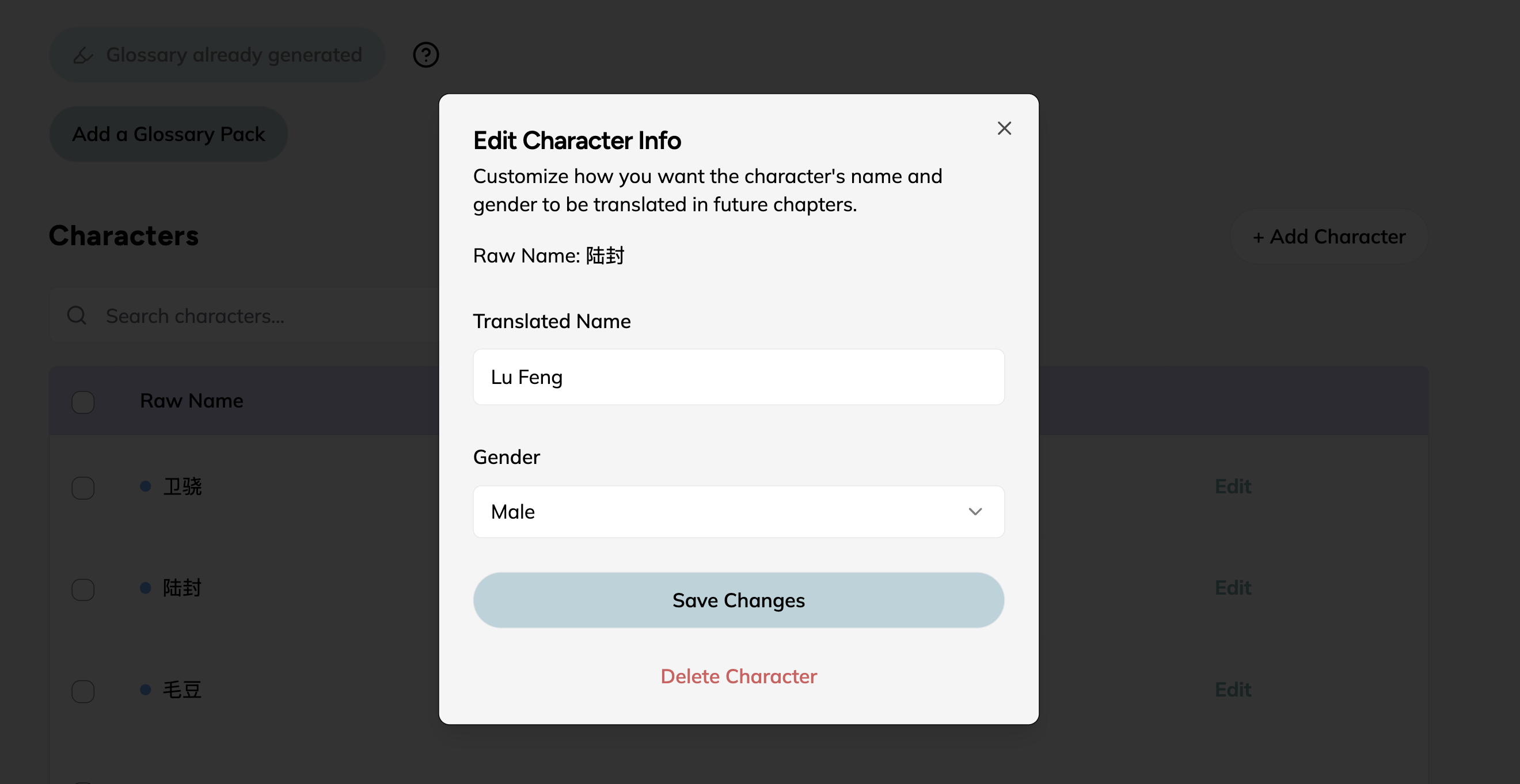
We detect characters and terms for you from the novel content, and let you customize these to keep the translation throughout the novel.
Prefer reading on an e-reader? We'll auto-translate the novel while you sleep, and you can download it as an ePub after.
AI made a minor mistake? Edit the translation on the spot to make it perfect.
Start with a no-risk free trial, then upgrade to our basic plan for $4.99 / month. Cancel at anytime.
FAQ
Everything you need to know before you start translating.
We have a free plan so that you can try OpenNovel with no credit card required. When you're ready for more translations, the Basic plan starts at $4.99/month and you can cancel anytime.
Paste a chapter link from almost any novel site, drop in raw text, upload images, or import an ePub. For sites that require a login, use our browser extension. Once you've translated a chapter, hit Next to auto-fetch and translate the following one.
We constantly evaluate new models and automatically pick the best one for you. Our AI system contains custom improvements specially tuned for web novels, and many of our users have commented that they prefer OpenNovel over ChatGPT. A glossary also keeps character names, pronouns and key terms consistent across every chapter in the novel!
You can translate Chinese, Korean, Japanese and other web novels into English, Spanish, French, German, Arabic and 15+ more languages.
Yes! OpenNovel works on iPhone/iPad, Android, and laptops or PCs, so you can pick up where you left off on any device.
Standard translations are a great balance of quality and price. Boosting a chapter uses an even more advanced model for even higher quality.
We accept a variety of local payment methods, credit and debit cards, Paypal, as well as Apple Pay and Google Pay. GCash and Maya virtual cards work too.
Sign up for KakaoPage outside Korea, top up credits and buy novel chapters, then read them in English. No Korean phone number needed.

Where to find Japanese light novel raws, from free web novels on Syosetu and Kakuyomu to published ebook volumes, and how to read the raws in English.
An MTL novel is a machine-translated web novel. Here's why raw MTL mixes up names and pronouns, and how to make Korean, Chinese and Japanese MTL readable.